I Turned My X Into a Power User’s Toolbox
A private feed, an unanswered-comments filter, a prospect workspace, and AI drafts. Here is how my desktop setup grew around the things I actually do.
The feature that made the whole project click was a button that hid comments I had already answered.
I could open one of my posts, switch on Filter unanswered, and focus on conversations that still needed a response. Completed exchanges got out of the way. New follow-up comments could stay visible.
It is a small change. It also describes almost everything I have been trying to build.
I wanted the useful parts of my X routine to take fewer decisions. Who do I want to read? Which conversations need me? Where should I keep people I might want to follow? What did I actually get done today?
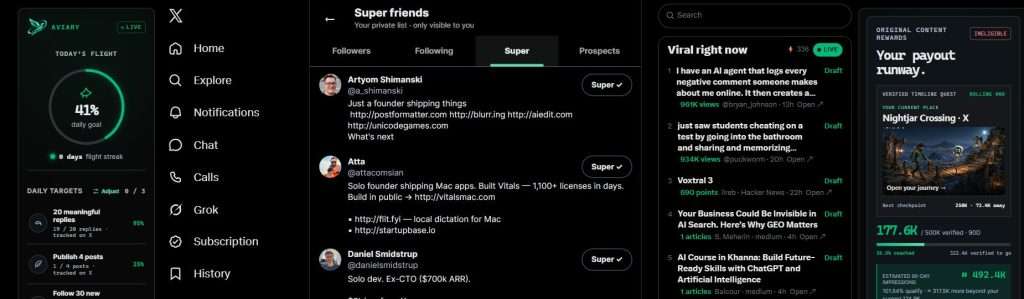
Those questions became Aviary, a Chrome extension that adds a personal workspace to desktop X. Alongside PI Answer, it now brings together a private feed, conversation filters, prospect research, viral discovery, and reply drafting.
I build Aviary and PI Answer. This is a look inside my own working setup, including the decisions and rough edges behind it.
It started with a day that needed a shape
The original idea was simpler than a toolbox. I wanted to see my everyday activity turn into something I could follow.
A thoughtful reply, a finished post, and a new person worth following are separate little actions. Aviary gives them a shared place in the day. Adjustable goals track replies, posts, and new follows. A streak records consistency. An expedition map carries progress forward.
There is a playful detail I still like: reaching 100% opens Overdrive. Extra activity can keep moving the journey. The map has somewhere else to go.
The targets are adjustable because a useful daily rhythm has to fit the person using it. I can choose a lighter pace instead of turning every visit into an obligation.
Creator Rewards has its own view, based on snapshots captured when I visit X’s analytics and rewards pages. That distinction matters. A completed daily goal and X’s monetization requirements measure different things. X remains the source for eligibility.

I gave my favorite people their own front door
There are people I follow because I actively want to keep up with their work. A busy timeline makes that an easy intention to lose.
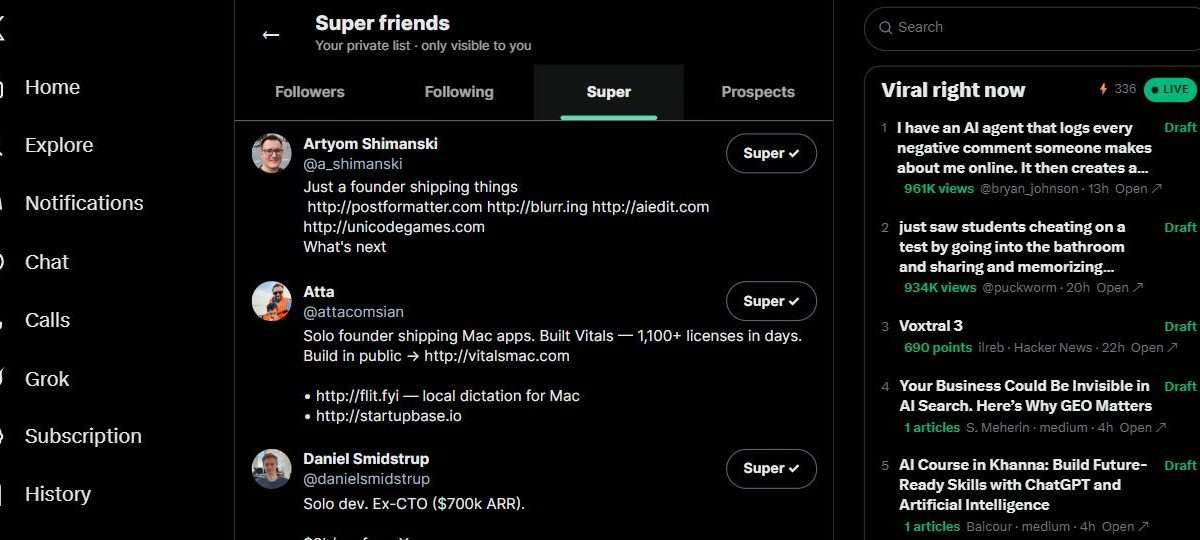
So I added Super friends. A star on a profile saves that person to a private circle. The Super tab opens their original posts and quotes, with replies and ordinary reposts filtered out.
That changes the first decision of a session. I can start with the people I chose.
The list has photos, names, handles, and bios. Adding someone does not notify them or create a public X List. It stays in my Chrome profile. The posts themselves still come through X’s native search, so protected or unindexed posts may be missing.
I can also turn the circle into an image card for an X draft. That makes it easy to thank the people whose work I keep coming back to.

The most useful filter was the smallest one
Back to that unanswered-comments button.
When a post has several conversations underneath it, I want to see where I can still contribute. Scrolling past my own earlier replies makes that harder to judge.
On my own posts, Filter unanswered hides conversations that Aviary can visibly connect to a reply I have published. Show all comments brings them back. The setting belongs to that individual post.
It works from conversations X has loaded. If a reply has not appeared on the page, Aviary cannot reliably use it as evidence. Opening the composer or generating a draft also does not count as answering someone.
I added a related control to my Following page. Not following back hides accounts carrying X’s “Follows you” badge. It is a way to review the remaining visible accounts, using the relationship information X provides.
Both controls help me make a specific decision while I am already looking at the relevant page.

A list of 500 people needed somewhere to live
I already had a researched list of 500 accounts that might be relevant to my tools. A spreadsheet could hold the information, but the next action happened on X.
That became Prospects.
I can import accounts, browse their profiles in a familiar people-list layout, and choose Follow or Skip. Photos and public follower and following counts help when available. A confirmed follow removes the account from the pending list once Aviary observes X’s Following control.
The confirmation remains X’s own. I still decide whether to follow each person.
There is also an optional research workflow. I describe the audience, add search phrases or starting accounts, choose follower and posting criteria, and set a target and energy budget. Aviary opens a dedicated X tab and uses PI Labs Premium to assess selected public profile evidence.
I can review the reasons behind a suggestion, keep uncertain results separate, export a backup, or pause the run. If X stops loading enough information, research pauses and keeps its checkpoint.
Building this made one requirement especially clear to me: finding people and deciding to approach them should remain separate steps.

I brought discovery and drafting into the same workflow
Sometimes I open X with something to say. Other times, I want to see which conversations are becoming interesting.
Viral Right Now puts a discovery feed in X’s sidebar, with source information, activity signals, and timestamps. It can surface public X posts alongside material from sources such as Hacker News, GitHub, Medium, and Hugging Face models.
The separate Viral tab explores English X posts from the past 24 hours with at least 200,000 views. It checks the posts X loads, rather than promising an exhaustive view of the platform.
With PI Answer installed, I can move from a post or supported source into a draft using my writing-style settings. I review it, change what needs changing, and decide whether to publish.
One early article draft missed the source’s main takeaway and wandered into an opinion about open models. That was a useful failure. A fluent sentence can still be the wrong response.
I want the source, the draft, and the final decision close together. That makes a weak draft easier to notice and a useful one easier to improve.

The boundaries are part of the product
Aviary’s daily activity, saved people, prospect database, and analytics snapshots are stored in the Chrome profile. Core features do not need a separate Aviary account or an X API token.
Optional online features have their own data flows. Research sends the audience brief and selected public profile facts and post excerpts to PI Labs and its model provider. It requires Premium and uses energy. Prospect photos and counts may be looked up through FxTwitter, with images loaded from X.
Viral sharing is off by default. Enabling it submits qualifying public posts I encounter to pilabs.space and unlocks the sidebar feed for free. Premium members can access that feed without sharing. PI Answer handles draft generation with its own account and settings.
Those distinctions matter to me. A useful workspace should make it clear which features stay local, which connect to a service, and which actions remain mine.
How I use the toolbox
- Choose a starting point. Super gives me people I deliberately want to read. Viral gives me a different route into current conversations.
- Return to my own conversations. On a busy post, I filter for comments I have not answered.
- Review a few prospects. I read the profiles and make individual decisions about who to follow.
- Use a draft when it helps. PI Answer gives me something to work with. I check the source and edit before publishing.
- Check the day’s progress. The daily goals and map show what I have done and what I might do next.
The setup is still evolving. Each addition has come from a small, specific annoyance I could point to on the screen.
That is the part I would borrow for any personal tool: start with the moment where you repeatedly stop, scroll back, or try to remember something. Put a useful control there.
For me, one of those controls was a button beside a timestamp.
What is the one small feature you wish your desktop X had?
You can find Aviary in the Chrome Web Store and explore PI Answer and the other PI Labs tools. Core Aviary features are free. Research and PI Answer require PI Labs Premium.
The screenshots show my working desktop build. The newest features can appear here before a Chrome Web Store update has finished rolling out.

My profession is online marketing and software development (10+ years experience), a lot of AI related projects nowadays, check my latest works here. But my real passion is reading books both fiction and non-fiction. I have several favorite authors like James Redfield or Daniel Keyes. If I read a book I always want to find the best part of it, every book has its unique value.